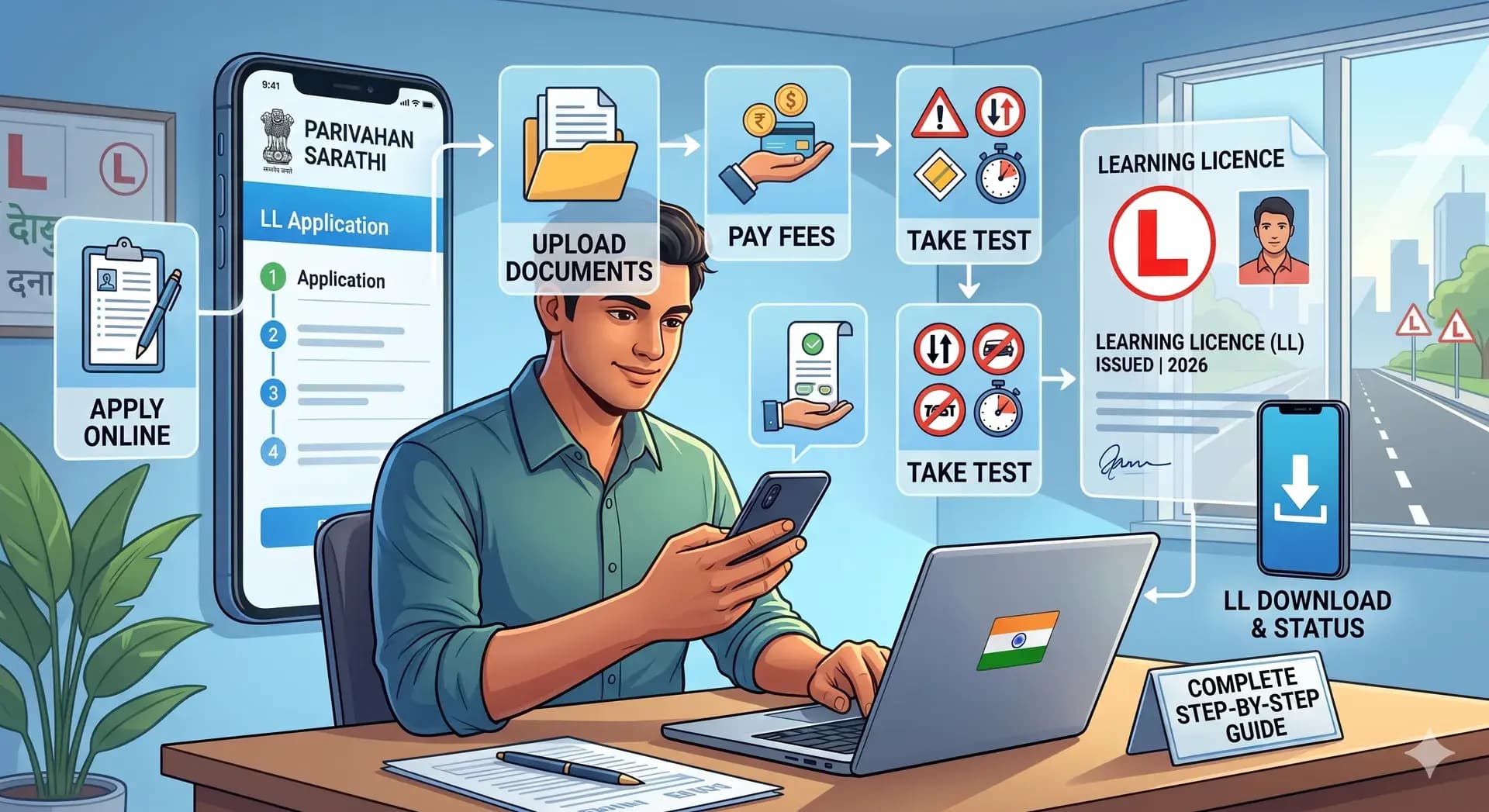
Learning Licence Apply Online – Complete Step-by-Step Guide (LL Application, Test, Fees, Rules & Download 2026)
Driving Licence2026 guide

Learning Licence Apply OnlineComplete Step-by-Step Guide (LL Application, Test, Fees, Rules & Download 2026)

R
RTO Vehicle Information
May 13, 202612 min read

Applying for a learning licence online is the first step before a permanent driving licence in India. This guide covers eligibility, documents, fees, the test, download, status, rules, and common issues — using the official Parivahan / Sarathi flow.


What is a Learning Licence (LL)?

A learning licence is a temporary licence for beginners. It lets you practise driving legally under supervision and is mandatory before a permanent driving licence.

Why it matters

  • Required before a permanent driving licence
  • Legal supervised practice on public roads
  • Builds knowledge of traffic rules
  • Mandatory under Indian motor vehicle law

Learning Licence validity

  • Usually valid for 6 months
  • Apply for permanent DL within this period
  • After expiry you may need to reapply

Plan your permanent licence within the LL window — waiting until the last week often causes expiry and rework.

Tip

Eligibility for Learning Licence (Detailed)

Age criteria

  • 16 years — gearless two-wheeler (with parental consent where required)
  • 18 years — cars and motorcycles
  • 20 years — commercial vehicles (as per category rules)

Other requirements

  • Understand basic traffic rules
  • Pass the learning licence test
  • Submit valid documents and photo/signature

Types of Learning Licence

Motorcycle

MCWG or without-gear categories for two-wheelers. Choose what matches the vehicle you will train on.

Light Motor Vehicle (LMV)

Cars and light four-wheelers. Most private car learners select LMV after checking state-specific wording on the form.

Commercial

For transport/commercial driving. Age and medical requirements are stricter — confirm on Sarathi before applying.

How to Apply for Learning Licence Online (Step-by-Step)

Official process via Parivahan / Sarathi:

1
Visit the official Parivahan Sarathi portal and open Driving Licence services.
2
Select your state, then choose “Apply for Learning Licence” to start a new application.
3
Fill the application form carefully with personal details matching your ID proofs.
4
Upload required documents (identity, address, photo, signature) in the prescribed format.
5
Pay the application and test fees using UPI, card, or net banking and save the receipt.
6
Book your learning licence test slot as per availability at your RTO or online (state-dependent).
7
Appear for the MCQ test on traffic rules and signs; pass to generate your LL.
8
After approval, download your learning licence PDF from the portal for your records.

Before you start

Stable internet

Uploads can fail on weak connections

Correct category

Pick MCWG / LMV / commercial as per your goal

Official portal only

Avoid third-party agents and fake links

Keep Aadhaar, address proof, and a clear photo handy to avoid rejections.

Apply on Sarathi (Parivahan)

Start or continue your learning licence application on the official government portal.

Open Sarathi portal

Documents Required for Learning Licence (Complete List)

Identity & address proof

  • Identity: Aadhaar, PAN, or passport (as accepted in your state)
  • Address: Aadhaar, voter ID, or utility bill

Other documents

  • Recent passport-size photograph
  • Scanned signature (as per portal specs)
  • Any category-specific medical or forms your state asks for

Learning Licence Fees (indicative)

ServiceFee (approx.)
Application₹150 – ₹200
Test fee₹50 – ₹100

Learning Licence Test – Key Details

Format & topics

The test is usually MCQ on traffic rules and signs. Question count and passing percentage vary by state; online proctoring or RTO-based tests depend on local configuration.

  • Traffic signs and road markings
  • Safety and right of way
  • Signals, overtaking, and parking basics
  • State-specific rules shown in the official manual

Most failures are from skipping mock tests — traffic signs and right-of-way questions repeat often.

Exam tip

How to Prepare for Learning Licence Test

  • Study the official question bank or handbook for your state
  • Practise daily with short mock quizzes
  • Revise signs with images, not only text
  • Sleep well before the slot to avoid careless mistakes

What Happens If You Fail the LL Test?

  • You can usually rebook another test slot
  • Full fresh application is often not required
  • Use the same portal login to track status and next steps

Download, Status & Applying from Home

Download LL PDF

After you pass, the learning licence is generated online. Download the PDF from Sarathi and keep a copy on your phone.

Check application status

  1. Open Parivahan / Sarathi for your state
  2. Use “Application status” or similar menu
  3. Enter your application number from the receipt

Apply from home?

  • Form and uploads are online for most users
  • Test may be online or at RTO by state
  • Biometrics or visits are only when the workflow demands it

Rules with LL & If Your LL Expires

Rules with a learning licence

  • Drive only with a valid permanent licence holder beside you
  • Display “L” as required by local regulations
  • Do not drive solo until you hold a permanent DL
  • Obey all traffic laws — LL does not relax penalties

If LL expires

  • You may need to reapply for learning licence
  • Test and fees may apply again
  • Check the portal for “renewal / fresh LL” wording in your state

Common Problems While Applying

Application rejected

Common causes: mismatched name spelling, wrong document category, or blurry uploads. Re-upload after reading the rejection reason on the portal.

Test failed

Insufficient preparation is the main reason. Use official mock tests, then rebook when your state allows the next attempt.

LL not generated

Server delays or pending verification can hold the PDF. Recheck status after a few hours; avoid duplicate payments.

Mistakes to Avoid

  • Entering wrong personal details vs Aadhaar
  • Uploading cropped or unreadable documents
  • Ignoring mock tests before the MCQ
  • Missing the test slot without rescheduling in time

Learning Licence vs Permanent Licence

FeatureLearning LicencePermanent Licence
Validity6 monthsLong-term
PurposeLearning under supervisionFull driving privileges
TestRules MCQ (basic)Road / skill test (varies)

Online Benefits & Expert Tips

Benefits of applying online

  • Fewer physical visits
  • Transparent fee payment
  • Easy status tracking
  • Digital LL download after approval

Expert tips

  • Apply in a quiet slot so you can complete uploads in one go
  • Double-check category (MCWG vs LMV)
  • Save application number and payment receipt
  • Prepare for the test at least 3–4 days early

Ready to start your LL?

Use only official Parivahan / Sarathi links. Save your application number for status checks.

Go to Sarathi

Never share OTPs or pay unknown agents. Government fees are paid only on the official portal.

Stay safe online

FAQs

How to apply for learning licence online?

Open Sarathi Parivahan, select your state, choose Driving Licence services, then “Apply for Learning Licence”. Complete the form, upload documents, pay fees, book the test, and download LL after passing.

Can I give the LL test online?

Many states offer online MCQ tests from home; others require an RTO visit. The portal shows available modes when you book your slot.

What is LL validity?

A learning licence is generally valid for 6 months. You should apply for a permanent licence within this period.

Can I drive alone with a learning licence?

No. You must be accompanied by someone holding a valid permanent licence for the same class of vehicle, and display L plates as per local rules.

What happens if my LL expires?

You typically need to reapply and may have to take the test again. Check your state’s rules on the official portal.

Final thoughts

A learning licence is straightforward when you follow the official flow, keep documents clear, and prepare for the test. Complete permanent licence steps well before expiry to avoid repeating the cycle.

Disclaimer: This article is for general information only and is not affiliated with any government body. Always rely on official Parivahan / Sarathi portals and current state notifications.